Wednesday, April 30, 2014

My Tips from a Visit to the Allen County Public Library's Genealogical Collection

Last week was a first. Instead of driving straight home from a trip to one of my sisters, we veered and ended up in Fort Wayne, Indiana, for a visit to the Allen County Public Library’s Genealogical Collection.

This was not our first visit to the library. It was actually our third or fourth visit. But it was the first time we had thought of working a visit to the library in with this well-worn drive to my sister. The veer was not close but do-able. Our last library visit was when the library was at a temporary site ... so it has been quite a while between visits.

I thought I would share my tips and thoughts about visiting this library.

First, plan everything before you depart! Use the library’s website. Use your favorite trip/hotel planning sites for the non-library stuff. Do not wait until you arrive to figure out where to stay and what to search.

The Library Website


Using the library’s website is a must before you visit. By searching the various catalogs and making a To-Do List, you get more time to do research on-site. From the Allen County Public Library’s main page, click on the genealogy tab to enter The Genealogy Center. Or just go straight there from the link here.

The Genealogy Center website is your hub for planning your visit. Add it to your bookmarks/favorites.

Check boxes to the left of entries allow lists to be made.
There are several links throughout the main site page to the main ACPL Catalog. I suggest using the Advanced Search to control your searches better. Looking for a specific book, put it in the title to see if the library has it. To catch the most possibilities, use the subject to search by County and State, or Surname. Make a list of items to look at by clicking the check box by each individual item you want and when done, select the print link under the Genealogy Center Catalog logo. (I “printed” my choices to PDF files and then printed certain ones to paper later.) This catalog shows you books, microfilm & microfiche, online documents, and magazines & newspapers.

But this is not the only catalog you should investigate.

Under the Databases tab, you’ll find two choices. On-site Databases is a listing of the subscription databases available for use while at the library. See one you don’t have access to already? Add it to your list with what you want to investigate on it. The Free Databases is where you will find links to a wide variety of specialized catalogs. Definitely click this link.

The Microtext Catalog is segmented into specific categories. The best way I found to make a To-Do List from this catalog is to copy and paste into a Word or Excel document file. This way I got specifically what I wanted instead of everything on the page. If the main catalog shows microfilm and microfiche, why use this catalog? Because I spotted that not all of the microtext shows up in the main catalog. And, the microtext catalog gives you links to more details about what is on each film/fiche for most collections.

For example, I discovered searching the Microtext Catalog by state “New York” that ACPL has microfilm of the Robert Livingston Papers. I was not expecting this! A search of the main catalog with Robert Livingston as the subject brings up 7 items. One item is a book guide to the films but the others are just books. So back in the microtext catalog, clicking on the name “Robert Livingston Papers” brings up a list describing the 57 reels of film for this collection. I printed this detailed list for later use.

Also among the Free Databases are specialized catalogs for Family Bible Records; Family Resources; Allen County, Indiana, Resources; Indiana Resources; African-American and Native American Resources; Other States Resources; and Our Military Heritage. Another catalog is the Genealogy Center Surname File which can be searched to find others who have visited ACPL that are searching your surnames.

I think you can see how quickly your To-Do List will grow. Make sure to prioritize your list so you get to those items you really want to see first.

From the main tab links at the top of the main page, Pathfinders will take you a variety of help guides including ones on how to search the catalogs better. Most of these are the same handouts at the library. Why wait to find out what goodies they contain? Find the topics and states that you need, read the PDF version of the handout and add items to your To-Do List.

Near the bottom of the page on the left is the "Planning to Visit?" section which organizes more than just the library hours. The Local Information button will take you to a page with the library address, a Google map showing the location and buttons to PDF files of the library layout, eateries map and parking map that you can save/print. The Orientation Video link on the page did not work for me. But I was able to find the orientation video on the library’s YouTube channel. Though it is about six years old, the video which is in two parts (part 1 and part 2) is still relevant. You get a good lay of the land for the Genealogy Center by watching these videos.

The Events Section lets you see what is going on at the library. Got a question you have not found the answer to on the website? Use the Contact Us link. The response is fairly quick.

At the Library

A USB drive turns a printer into a scanner.

Ask Desk. Once you get to the library, do stop at the main Ask Desk as you enter the Genealogy Collection. Pick up a handout with the more detailed floor layout for the collection. If you plan to use the computers and on-site databases, pick up a temporary library card printout. (These are good for just that day.)

Copy Cards. Do you have an older ACPL Copy Card from a previous visit? Not sure if there is any money left on it? Bring the card with you. If you stop at the main Ask Desk, they can check the card for value and if there is, they will transfer it to a new copy card. My ACPL Copy card had the logo printed in red. Sometime after the logos were printed in maroon (as seen in the orientation video). Currently the ACPL Copy Cards have a black logo with a bar code instead of a magnetic strip.


One of the Reading Table Areas.
USB Flash Drives. ALSO, bring a USB flash drive with you. With a USB flash drive inserted into a photocopier you can turn it into a scanner. The scans are free but you need a copy card with value on it to activate/unlock the copier. Check the settings prior to scanning anything. The default setting is a 200 resolution PDF file. So everything scanned in one session will end up in one file. I preferred to scan my various books at a resolution of 300, grayscale or color and saved with the tiff/jpg setting. This gave me individual files for each scan. That way I can rename each individual file with a meaningful name for each page image later. If you forget your USB drive, the Ask Desk has some for sale. (I don’t know for what price but at least you don’t have to find the nearest store.)


Wood versus Black Metal.
Reading Tables. Reading tables are located in two spots of the Genealogy Collection. Most of the tables have built in power outlets. The library has wireless internet so your laptop/tablet/smart phone can stay connected. (Obviously don’t leave your valuables unattended. There are no patron lockers.)

The Book Carts. Here’s the 411 on the book carts. The wood book carts are return carts that staff periodically roll away to reshelf the books. So when you are done with a book place it on a wood cart. The black metal book carts are for the use of patrons. Don’t feel shy about using them. The book shelf you want is likely a good distance away from where you are seated. For the safety of yourself and the books, use a black metal book cart to move the books around.

Microfilm Cabinet
Microfilm/Microfiche and Scanning. At the desk in front of the Microtext Reading Room, pick up a handout with the detailed layout of the microtext cabinets. Finding a specific microfilm/microfiche is quicker with a map. In the reading room, you will find row after row of film readers. And, a couple rows of microfilm/microfiche scanners. If the library is busy, find your item with a reader and then use the scanner. With the film scanners, you do not need a copy card to activate them. Just insert your USB flash drive into the computer. Directions on how to use the scanners are not readily available, so ask a librarian for help. There are two different scan programs. One is overly simplistic but the librarian could not give me details on the settings used and there was no cropping available. The other has many user selectable scan settings but the program is very slow to make each scan.

I found these scanners were not as easy to use as the film scanners at the Archives of Ontario which is a different system. Film scanning was the last thing we did before leaving. If I had more time to play with the settings and check the results on my laptop right there, I think I would be a bit happier with the results. The next visit we make to this library, these films are at the top of the To-Do List.
Microtext Reading Room with scanners.

The Other Stuff


As far as hotels, we did not see any need for us to stay in downtown Fort Wayne where prices are much higher. The hotel we picked was not the cheapest nor the most expensive. What it did have was good reviews for cleanliness/service and a location just 15 minutes from the library. Now for some that may sound too far away but it really was a super quick and easy drive from the hotel to the parking garage below the library.

Speaking of parking, though the library’s website shows where the closest parking is in relation to the library it does not mention costs. The garage and lots nearby are $1 per hour with a maximum of $7 per day. Don’t leave your parking ticket in the car, take it with you. You pay by cash or credit card at the kiosk in the library’s lobby to the right of the check-out counter. You have 15 minutes to get back to the car and exit the lot. Otherwise, you can pay at the gate with a credit card when exiting. I also noted a sign in the garage said you have to have your car out of the garage by 9:30 pm. (I think for security reasons you get towed if it is still there.)

Summing it Up


We got a lot checked off our To-Do List for this library, but there is still plenty left on it.

ACPL has a large collection of Ontario cemetery readings and other books. (I feel Canada is a bit behind in getting cemetery tombstones on the internet. There does not seem to be as many posted as for the United States.) So we concentrated on Ontario for a good part of the day and then moved onto New York books that we had not seen yet. The last thing we looked at were the microfilms of the Robert Livingston Papers. Unfortunately, we ran low on energy and did not get through the films that looked promising. We scanned several pages but have a list of other pages found that will need to be copied during the next visit. This collection will be at the top of our revised To-Do List.

One of my next steps now that we are home, besides entering our finds, is to investigate the Robert Livingston Papers more thoroughly. I want to determine the origin of the collection on these microfilm. The catalog entry mentions the New York Historical Society. Are these books/papers the same or different than the what is in the Livingston collection at Princeton University? The ones at Princeton are on my wish list of sources to see one day.

It was a long, productive and exhausting day. (Probably because I was the driver.) We could have stayed a day or two more but we kept it short. Hopefully, our next visit to Allen County Public Library will be before the library remodels or moves again.

Monday, April 28, 2014

Happy Birthday -- Martha!

Just realized today while working on her family that my 5th Great Grandmother Martha's birthday was two days ago! So today that makes her 261 years and 2 days old! Sorry Grams for not realizing it two days ago. Unfortunately I don't have time today to write much more.

Wednesday, April 16, 2014

A Genealogy Analogy: Do You Get it Now?

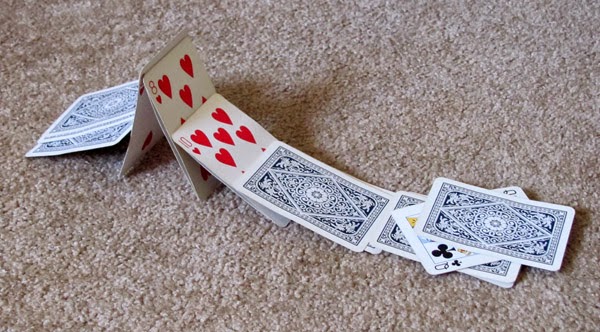
If you think of your Family Tree as a House ...
then Sources, Citations and your Analysis are the nails, mortar or glue that hold everything together. Without Sources, Citations and your Analysis your Family Tree may collapse like a House of Cards.

A Family Tree can be like a House of Cards ...
no use of Sources, Citations, & Analysis can lead to a Family Tree Collapse. Don't Build a "Tree of Cards."
I don't know if anyone else has thought of this analogy but it has been running through my mind lately.

P.S. I thought it would take longer but it took less than 15 minutes to build this house of cards and I haven't built one in many, many years. The time for my family tree is another story ...

Monday, March 10, 2014

Digging for the Date of Added/Updated Databases in New Search now Primary Search

One aspect I preferred in the "Old Search" experience was that information or details seemed to be more in the open. With "New Search" or as Ancestry.com started calling it today "Primary Search" those details seem more buried and require digging to find what should be visible.

Have you ever checked to see what database collections have been recently added or updated?

From the Main Search page in Old Search one would scroll to the bottom on the page and select the "recently added" link at the bottom of the right-hand column. From there you landed on a page (I wish I had a screen capture of this from Old Search), where you could see in one spot/list what had been added or updated to the website. Besides the database collection name, it clearly showed a graphic indicating updated or added AND gave you an actual date that this took place. So if you knew you last checked the list on a particular date, you could easily and quickly scan the list until you spotted that particular date. If needed, you could narrow the list by a particular country or show all countries at once.

Does New Search/Primary Search have this list? Yes, but it is not as convenient to use or to scan for updates/additions. Why?

Well, from the main search page you now have to click on the "view all in catalog" link at the bottom of the right-hand column. But this just takes you to the catalog page. So then you have to change the "sort by" from "Popularity" to either "Date Updated" or "Date Added."  What once was one list is now two lists!

Now as far as figuring out what is new or added since you last checked that requires more effort. Instead of a column in each list giving the actual date the addition or update took place (like in Old Search), Ancestry.com thinks you should roll your mouse over each database title. Then you have to wait for a pop-up bubble to appear giving you: the title of the collection, the date it was published, the date it was updated and a very brief line or two describing the database. This takes considerably more time having to wait for each pop-up to appear to learn the date. (And to be honest, I discovered this pop-up bubble by accident when my mouse slid off my lapboard one night.) Oh, the lists can be narrowed using location filters in the left-hand column.

To me as a user, if I am looking to learn what has been added or updated recently on the website SEEING the date added/updated is more important than seeing how many records are in each database or in what category the database was placed. Because the goal of my task is to learn what is new. Wouldn't logic say that date should be clearly visible rather than hid?

Yes, there seems to be "spacing issues" on the catalog page. But I suspect the information appearing in each column are values tied/coded to each database. My programmer brother says it is not that hard to re-program a column on one or two pages to "read" another value. (If it can appear in the pop-up bubble it can appear in a column and vice-a-versa.)

I have used the Ancestry.com Feedback (and an old survey a long time back) to point this and other things out. I just thought to share with other "Old Searchers" how to do what we did quickly and easily in Old Search days in the New Search/Primary Search albeit not as quickly and easily.

©2014, goneresearching. All text and photos in this post are copyrighted & owned by me (goneresearching) unless indicated otherwise. No republication (commercial or non-commercial) without prior permission. You may share (tell others) of this blog as long as you give credit and link to this site (not by downloading or copying any post). Thank you.

Thursday, March 6, 2014

Ancestry.com Old Search is dead -- March 6, 2014 -- it is a Sad Day for Me

I logged in today at about 3:35 p.m. and made the horrible discovery that Ancestry.com has killed "Old Search."  It was still there earlier this morning and now it is not. 

My friend the little switch link (new search/old search) in the upper right hand corner under the line of tabs is now gone. I wish there was a cheat code like they have in many computer games for infinite lives.

And NO Ancestry.com still has not fixed either the New York Passenger Ship List or the Hamburg Passenger Ship List specific search interfaces. Both still lack the age/birth year search parameter. (See my earlier post.)

Not looking forward to crawling instead of running through the passenger lists.

Monday, March 3, 2014

Mourning the Coming Death of Old Search -- New Search Still Lacks in Areas

A blue banner appeared on top of the Ancestry.com search pages a few weeks ago, informing users the final death of Old Search is very near. March is going to be a black month. Perhaps the banner color should have been black not blue.

Yes, I still use and prefer Old Search.

I tried New Search when it first came out. My experience -- lots of junk results that simply slowed down my research. I went back to Old Search and went back to being very happy. Much later I tried New Search again after announced changes. Again, too much junk in the results. There was a bit more control but not enough for me. Click on the Old Search link on the right under the page tabs -- back to happiness.

When the option to use Old Search was removed from Ancestry.com LibraryEdition, helping people while volunteering at the library became frustrating for me. I made sure to bring my own laptop so I could do a search using my subscription on my laptop and then figure out a way to make the result come up for the patron in LibraryEdition on the library's computers.

Another round of tweaks to New Search seemed to lessen the junk in the results list some more but New Search is still lacking, especially in one area: the specific search engine interfaces for the New York Passenger Lists database and Hamburg Passenger Lists database.

What is lacking? The ability to use Age/Birth Year parameters in your search on these databases in New Search. The ability is there in Old Search. Why, oh why, is it not there in New Search?

Yes, the ability appears to be there in New Search for the search engine of the whole Immigration Category. But you have to dive down into the category to get to the specific database (New York or Hamburg) and once there the age/birth year parameter stops working. Then you have to climb up the category to tweak the age/birth year and dive back down into the category to see the new results. A waste of time if you ask me.

When you know your person came through a specific port, why waste time sifting through irrelevant results? Instead, focusing your search on a specific database immediately eliminates those irrelevant results so you can concentrate on the real potential answers to your search quest.


I lecture on searching for German ancestors and I do a lot of passenger ship list searches. But essentially for any nationality there are three major elements you need to know, have and use in order to find your ancestor(s) on a ship list:
  • Name of Ancestor(s) (as much as possible including nicknames)
  • Birth Date/Age at Arrival/Departure (as much as possible)
  • Arrival/Departure Year (it may be a specific year or range of years)
  • A fourth element that is helpful is knowing the Nationality or the State/Province of the Country your Ancestor(s) came from (i.e. Mecklenburg-Schwerin in Germany)
These are the elements that you need to plug into a search engine to find the result that is your ancestor. By not having the ability to use an Age/Birth Year parameter in searches of the New York and Hamburg Passenger Lists specific databases in New Search, Ancestry.com is tying a user's shoelaces together and slowing down research success. I want my searches to run not tip-toe so I've stuck with Old Search.

Being able to use an age/birth year parameter is important. Got a difficult ancestor(s) to find? One tip I have for researchers when they are trying to locate a family traveling together on a ship is to concentrate the search on the children not the parents. There seems to be less children compared to adults traveling in any given year. Having the ability to use age/birth year in a search quickly eliminates a whole bunch of people from the results list and increases the chances of spotting the desired ancestor.
.
Please Ancestry.com fix New Search's deficiency in the search engine interfaces of the New York Passenger Lists and Hamburg Passenger Lists databases. And while you are at it, fix any other specific search engine interfaces that have had their wings clipped in New Search. (At present, I know of just these two.)

Ancestry.com recently announced a new feature in New Search ... sliders to widen and narrow one's search. I'll be investigating that feature soon. I have a suspicion these sliders are going to be more like what Dad called the "idiot" lights that started appearing on a car's dashboard long ago instead of traditional gauges. You'll only know something has changed not why it changed. I hope that is not the case. I'll sum up what I learn about the sliders soon.

©2014, goneresearching. All text and photos in this post are copyrighted & owned by me (goneresearching) unless indicated otherwise. No republication (commercial or non-commercial) without prior permission. You may share (tell others) of this blog as long as you give credit and link to this site (not by downloading or copying any post). Thank you.

Saturday, February 1, 2014

War of 1812 Pension Find for Amos Butler

A couple weeks ago I made a time zone conversion error that resulted in an hour to wait around for a webinar to begin. (Actually I converted correctly but had the wrong start time stuck in my head.) Having already gone through the email and basics I check each day I started doing some genealogy searches to fill the time.

I don't remember how I ended up on what I did, but I found myself at Fold3 looking at the progress of the War of 1812 Pension Files project.

Years ago (before the rise of email and the internet) we did like many genealogists did -- requested a pre-printed form, filled it out with the magic words "please send the complete file" printed in ink at the top of the form, mailed it off using the U.S. Post Office, and waited. We actually requested one ancestor's pension file twice and got a few different pages each time. But it was cost prohibitive to send for every relation's file in hopes of finding a clue for our research. And since we had the most important file, a trip to see the records in person was lower on the list of places to take a research trip.

Fortunately, the 200th anniversary of the War of 1812 prompted the Federation of Genealogical Societies along with the National Archives, Fold3 and Ancestry.com to come together in the Preserve the Pensions project to raise funds for the digitizing of the War of 1812 Pension and Bounty Land files and placing them online for free. The goal is to raise $3.7 million dollars by the 2015's 200th anniversary of the War of 1812's end. Ancestry.com is covering half of the project cost by matching each dollar raised.

I was happy to see that it was now reporting the database was 13 percent complete. (The last time I checked it was more like 5 percent.) Unfortunately, most of my main surnames I want to look at are at the end of the alphabet and, of course, they seem to be scanning the files alphabetically starting with A. 

As I glanced around at what was available for each state now (it varies by state) I remembered a particular person in one of my collateral lines, Amos Butler of Otsego County, New York.

To my happy surprise I found his file was digitized and it contained 46 digital images. And an even happier surprise -- these digitized images are in color not black and white! Now I couldn't wait for the webinar to be over so I could concentrate on Amos' pension file.
War of 1812 Pension File for Amos Butler

So what did I discover?

The very first image is a header card or jacket cover that extracts pertinent information from the pages within the file. I've seen one before but this one was very nicely filled out. Some of that information on the card I have seen elsewhere. The real news for me in this case was that the file contained a "family record and sold. discharge ctf. filed in brief." Oh, joy!

Now don't get too excited. Remember, not every pension file contains pages torn from the family bible but occasionally you come across one.

Like any really good genealogist I made sure to download all the digitized page images in the file -- so I would have the complete file. Reading through the pages I realized this file mostly consisted of his widow's claim for a pension. (Sometimes you find these separate.)

When I came to digital images number 9 and 10 of Amos' file the fact that these images are in color came to life -- there sat two pages from the family bible. (They are in fact the front and back of one page.)
Bible Page of Amos and Clarinda Butler

The page torn from the bible contained birth information for both Amos Butler and his wife Clarinda North along with their many children on one side and on the other side Amos and Clarinda's marriage information.

Amos Butler son of John Butler and his wife Cloe, was born August 4th 1793.
Clarinda, wife of Amos Butler, and daughter of Benjamin North, and his wife Weighty, was born September 1st 1804
Warren B. son of Amos Butler and his wife, Clarinda was born August 20th 1821
Benjamin N. son of Amos Butler and his wife Clarinda was born Sept. 19th 1824
Hiram G. son of Amos. Butler, and his wife Clarinda was born July 10th 1826
Menzo W. son of Amos. Butler and his wife, Clarinda, was born Nov 6th 1827
Gabriel N. son of Amos Butler and his wife Clarinda, was born August 18th 1829
Sumner Ely Butler was born June 3rd 1831
Amos Butler Jr was born March 29th 1833
Deloss Butler was born April 21st 1834
Jerome Butler was born July 2 1836
Bible Page of Amos and Clarinda Butler
Waity Elizabeth Butler was born March 11th 1838
John G Butler was born July 1st 1839
Victoria Butler was born December 2nd 1840
Clarinda Butler was born February 7th 1842
Amos Butler Jr. was born September 16th 1844
Frank Butler was born March 10th 1850

Amos Butler, and Clarinda North, were married December 25th in the year of our Lord 1819

Were all these names and dates new to me? No. 

The marriage date in the bible matches the date I had from in a newspaper abstract. I had some of the children's exact birth dates but not all. One interesting thing I noted from the bible page is that Clarinda's mother's name was spelled Weighty while Clarinda's daughter's name was spelled Waity. But clearly (at least to me) it is the same name: Weighty got her name from Waite, the maiden surname of her mother (Clarinda's grandmother.) Again not spelled the same but clear in its intention.

Other interesting information gleaned from the pension file so far:
  • From widow's brief: 
    • Aaron and Abby Jane North were witnesses to Amos and Clarinda's marriage. [Note to self: investigate their relation to Clarinda.)
    • Amos and Clarinda's cohabitation was shown by affidavits of Daniel W. and Belinda W. Wait. [Note to self: investigate their relation to Clarinda.]
  • From Aaron and Abby North's affidavit: they were present at the marriage of Amos and Clarinda "in the house of Benjamin North in the town of Middlefield." [Note to self: recheck research done on the North family of Middlefield.]
  • In a note accompanying Clarinda's declaration for bounty land, it says: "The above named widow is the mother of eighteen children and all of her sons are supporters of the present administration."
  • In the correspondence letters: I learned that Clarinda's lawyer died while she was trying to get her widow's pension thus delaying the process. 
  • In the correspondence letters: I learned that Clarinda "temporarily lived" in Cleveland, Ohio, for a short period of time. [Note to self: recheck prior research to recall who of Clarinda's relatives went to Ohio.]
In the process of analyzing this new information I noticed that though the note in the letter says she was the mother of eighteen children, the bible page lists just 15 children while prior to finding this pension file I had uncovered 16 children. Perhaps this disparity is the result of stillborn or children who died young. Another reason to recheck and compare this new information with my prior research.

I am sure analyzing the pension file further will yield more clues and avenues to research. I can not wait to see my ancestor's pension file digitized and learn if I had really been sent "the complete file" so many years ago. 

Source Citation:
"War of 1812 Pension Files", database, Fold3 formerly Footnote (www.fold3.com), entry for Amos Butler (Sergeant, Capt H. Sawyer's Co NY Militia, War of 1812), bounty land warrant no. 11143 including widow Clarinda Butler pension no. WO 35338, WC 22728; citing Case Files of Pension and Bounty Land Applications Based on Service in the War of 1812, 1871-1900; Pension and Bounty Land Applications based on Service between 1812 and 1855; Records of the Department of Veteran Affairs, Record Group 15; National Archives and Records Administration (NARA), Washington, D.C.

Note: The War of 1812 Pension Files, once digitized, are available on Fold3. They are free to search and view. If you want to download or print an image, you will need to create a log-in account which is free, no subscription necessary.

©2014, goneresearching. All text and photos in this post are copyrighted & owned by me (goneresearching) unless indicated otherwise. No republication (commercial or non-commercial) without prior permission. You may share (tell others) of this blog as long as you give credit and link to this site (not by downloading or copying any post). Thank you.